Saturday, January 03, 2009
2008: the year in complaints
Having a son has really cut into my blogging but a weight has hung over my head since I noticed a week or so ago that I actually have 10 subscribers on Google Reader. Instead of writing some long-ass blog entry with detailed, researched complaints, here are some short ones:
- Treo and Palm in general -- that company is dead. I switched to Blackberry. The incredible stability of the Verizon Blackberry 8830 has been amazing compared to the Treo 600, 650, and 700p I suffered with for four years.
- Windows Media Center -- I actually still use it but not to record TV. I got an HD DVR from my cable company for $9/mo and there is no way that will ever exceed all the money I spent on Media Center (PC, OTA HD tuner, extender, hard drives, antennas for OTA HD, etc.) and I still only get one HD channel reliably. And the SD cable picture sucked. When my cable company finally switched to digital (e.g. scrambled) cable it was time to choose Media Center or choose against Media Center. I chose against and so far, I miss 30-second skip (have to fast forward through commercials now) but other than that I have a much better picture and much more reliable recordings and behavior.
- Motorola S9 Bluetooth headphones -- these are cool and I got them with gift certificates so I'm not, like, burning with anger at these flaws, but I'm hard pressed to find situations in which the music stream doesn't skip. And, Blackberry's media player won't play audio through the S9 when playing a video, which was a huge disappointment (I was hoping to stop using the iPod and to just use these on my BB to watch videos). And, the iPod connector thing is so flaky that for days I didn't think it worked with my model of iPod (G5 Video). (The truth is that you have to wake up the iPod from deep suspended mode (where it shows the Apple logo to boot up) with the Bluetooth adapter connected, then play some music, and only then can you play video. If you let the music or video playing stop, you can't get it to start the Bluetooth thing again.) I like the idea of having these lightweight headphones that can play music on my Blackberry, and sometimes it works great (like if you are standing still on the subway, and turn off the Blackberry's cellular antenna) for music, and at the gym it is useful to go cordless with the iPod, but the connection is just flaky. I will someday get an iPod Touch but I do hope that it has A2DP Bluetooth built in by that point, working with video.
- Converting video -- I do this a lot as I grow obsessed with a TV series, buy the DVD or download all episodes from the newsgroups, and want to watch them on Media Center Extender at home or on iPod on my commute or on the treadmill at the gym. For the extender, make sure you get XVID video and MP3 audio. XVID + AC3 = pitch-shifted audio with silence every 5 seconds. (I heard that if you used stereo RCA jacks AC3 would be fine but that seems like a pain when I have an expensive Yamaha YSP amp with a coax digital connection which works fine for everything else.) So, basically no HD unless you find WMV content specifically converted for Xbox but I've found that can skip or have problems as well on the generally underpowered extender. For iPod, I use this random Aimersoft thing that has worked great (though not with AC3). Since I have to convert AC3 stuff to MP3 with AutoGK for the extender anyway, that leaves the extra step as conversions for the iPod. But basically it means that my PC is typically running some conversion process at all times.
- ThinkPad X60 Tablet with Vista -- This is my work PC and has been for close to two years now. I am growing to hate it but I'm not sure what would be better given that the weight, the battery life with the big 9-cell battery, and the 1400x1050 12" screen are all great. Wireless is flaky as hell (lately I can't switch it off with the hardware switch and then get it working again without a reboot), docking takes minutes and it never remembers that the monitor extends to the left, and the fingerprint reader only lasts for about 6 sleep/wake-up cycles before it is no longer recognized. That happens with a lot of stuff. I am rebooting every other day these days and that's BS. If anyone has suggestions on a business tablet that is a real speed improvement with equivalent weight and screen resolution, I'm all ears.
I have a much longer entry about the Treo/Blackberry thing among my OneNote pages here but I'll save that for another time or maybe it will never leave the drafts. I'm going to try to blog more and write less in 2009. Happy New Year,
--sbreck
Labels: DMA 2100, Media Center, TabletPC, Treo, Vista

Saturday, December 29, 2007
Reliability Monitor and its analysis of my work computer
First, my usual disclaimer:
Sorry I am such a lackadaisical blogger. Bizarrely, my traffic is basically the same whether I blog or not -- between 70 and 90 visits a day according to Google Analytics; although lately the trend is downward. I will try to get a series of shorter posts out more often than every 60 days. This is not one of these shorter posts.
Is there no way to gather more usable data from the Reliability Monitor? I ran it at work and it had data going back for three months, but seemingly no export capability. To get at the data, I screen-captured and pasted each screenful of data into OneNote, used "Copy text from picture", pasted them into TextPad to fix and put back into tabbed columns, and then pasted them into Excel. Now I can pull statistics like the following:
Application | Version | Failures |
Outlook | 12.0.6023.5000 (Outlook 2007, prior to SP1) | 13 |
OneNote | 12.0.4518.1014 (OneNote 2007, prior to SP1) | 9 |
Firefox | various (1.8.20071.12718, the most recent, has crashed the most, and it seems that 1.8.20070.25881 was the most stable) | 8 |
TabTip | 1.8.20070.25881 | 7 |
Communicator | 1.0.559.0 (2005) crashed 5 times, 2.0.6362.0 (2007) crashed once | 6 |
Interwoven DeskSite (Manage32.exe) | 8.2.87.0 (8.2, I think SP1) | 6 |
Procmon.exe | 1.0.0.0 | 4 |
SPCSCM.exe | 3.4.0.6 | 3 |
Visio | 12.0.4518.1014 (Visio 2007, prior to SP1) | 3 |
Excel | 12.0.6024.5000 (Excel 2007, prior to SP1) | 2 |
NiAiServ.exe (Enteo NetInstall) | 5.80.0.1399 | 2 |
...and 11 other apps crashed once.
So what information can we draw from this?
Outlook:
It's somewhat unfair to taint Outlook by problems caused by its add-ons, or the size (~2GB) of my OST file, but 13 crashes in two months (none were logged in December, it would seem) is a couple crashes a week. And also, I'm probably like everyone else in that Outlook is far and away my most used app. So I don't know if I rebuilt my OST in the December timeframe, or some add-on that was causing instability got disabled and I never noticed, but I guess it's been better lately. I'll have to revisit after running Office 2007 SP1 for awhile.
OneNote:
OneNote has no add-ons, so I would have to blame its instability on a) poor handling of the online/internet/offline transition and b) LiveSessions. I have a notebook that I use constantly that's on a file share at work, a few notebooks on SharePoint that I edit throughout the day, and maybe 15% I am in meetings taking handwritten notes with my tablet. I also spend about 15 - 20% of my time in LiveSessions with one or two colleagues, taking shared notes in meetings. Handwriting is pretty stable, I think it's the LiveSessions that cause some crashing, and some of it is just random lock-ups.
Firefox:
Before I looked at the above statistics, I would have sworn to you that, at work, far and away my least reliable application was Firefox, and I still feel that these stats don't capture every crash or lock-up that I experience with Firefox. It is telling that Windows Reliability monitor didn't log any Firefox crash for almost two months, between 9/20 and 11/15, while I guess it was on version 1.8.20070.25881 (or maybe some interim, extremely stable version between that and 1.8.20071.2514). I like to think that I have minimal add-ons in my work Firefox but I must have enough to cause a persistent instability, like freezing when I resize the window with an IE Tab page selected, or a freeze that just happens without using Firefox for awhile.
Why do I stick with Firefox because it's so unreliable? I guess my IE 7 experience was worse, or sufficiently different and lacking in functionality as compared to Firefox that it wasn't worth it. IE 7 didn't seem to have as robust a tab saving mechanism as Firefox, and it crashed often enough that a group of tabs that I meant to leave open were gone, and that really got on my nerves after awhile.
TabTip:
This is a TabletPC thing that Vista is convinced has some compatibility issue. I can't remember the error but Vista seems to periodically close it and throw some error message. Mind you, this has never happened when I'm actually in tablet mode or using tablet features, it happens when I'm doing something else altogether.
Communicator:
I don't remember this crashing, to be honest, so I don't know why.
DeskSite:
DeskSite likes to freeze up when you launch a document out of it -- it's not just a Vista problem, it happened a lot when I had XP, too. With the Vista error reporting feature turned on, most of the time I can actually find out why this is hanging -- typically it is Firefox but it can also be OneNote, Outlook, or Visio (which isn't really integrated with Interwoven yet and basically causes problems whenever it is launched).
I think I've already ranted about legal-specific software vendors, and I know this will be a popular search result because it contains the terms "Interwoven" and "SharePoint", so I will be gentle and note that despite my enmity towards the Interwoven product, its competitor (Open Text LiveLink eDOCS and whatever else they called it, formerly Hummingbird DM5) just a few days ago released their Office 2007 product. So, like, a full year after Office 2007 shipped. Shows you where the Open Text product is going -- down the toilet. (Disclaimer: The previous view is mine alone and does not represent the view of my employer)
Procmon:
If you forget about procmon and leave it running, you use up all your RAM and your computer falls to shit. Of course, you usually RUN procmon so you can figure out why something else is going to shit on your computer, so sometimes procmon is a symptom rather than a cause. Regardless, that's what's going on with my 4 procmon crashes, I think.
SPCSCM.exe:
I don't even know what the hell this is so I looked it up to find that it's the Sprint PCS Connection Manager. I delivered (and then took back two months later) an EVDO card to my colleague and so of course I installed the software for use on the trips to and from Chicago. I have a Treo 700p with PDAnet and the PCS software, despite the 3 crashes, was like 300 times more reliable than that piece of shit PDAnet. I'm glad I can get Internet access for free and only expensed $25 or whatever to my company. But I'd way rather not have to spend 20 minutes fucking with, and ultimately rebooting, my laptop to get stupid PDAnet to work. As I have said before, PDAnet is better than not having any Internet access, but not by much.
The rest:
I realize I'm detailing the apps that crashed on my work computer, which is inherently a fool's errand to begin with. But since I started it I might as well finish:
Visio: Visio 2007 Interwoven integration is non-existent, but for some reason it is enough to leave Visio.exe in memory, using 50% CPU and fucking up all other Interwoven calls, until you kill it. Hence the three crashes. I like to think that I am really good at Visio, but with 2007, if I can avoid using it, I will.
Excel: Excel is usually really good so I'm surprised to see these two crashes. I blame Interwoven for this, also. Maybe unfairly ;)
Enteo NetInstall: This company has like three support people in the U.S. and after two years of terrible service my company has ceased recommending its products. I try, on my computer, not to run NetInstall but there are some apps our IT people packaged that I need so I have to from time to time. This then leads to the inventory app running up my CPU utilization until the app is killed.
I was going to check my home PC against this, as I would think the results are very different, but I didn't realize how long this blog entry would turn out to be. I think that, in summary:
- Reliability Monitor would be even more useful if it could export its data to help you pinpoint your worst-behaved apps
- I think Reliability Monitor misses some crashes and hangs
- Firefox is totally unreliable on my work PC but is excellent at home with the same add-ons plus a dozen more; WTF?
- Interwoven DeskSite can cause unreliability
- Microsoft products crash the most :D
Back soon,
--sbreck
Labels: Firefox, Interwoven, OneNote, TabletPC, Treo, Vista
Tuesday, August 14, 2007
I'm back, with some miscellaneous rants
I recognize the shocking amount of time that has passed since I last blogged. Cut me some slack, we have a 2-month-old baby named Oscar now. Anyway, here are some little short rants to get out of the blogging standstill:
Palm sucks:
- Why does my dad's Verizon phone that he got for free have a pretty cool and useful GPS function using the built-in locator, but we Treo owners have to spend hundreds for external GPS? He paid nothing, and I (actually, my company) paid $585 for my phone (upgrade from 650 to 700p out of contract), so why am I the one who has no GPS function? Palm deserves a beating.
- I installed the 1.10 update so that my Treo wouldn't freeze up searching for a signal when I was on the subway. And now it's even worse. Palm, you suck. I'm switching to Blackberry as soon as I possibly can. Your platform is dead.
- Speaking of Palm sucking, that Foleo thing is the most useless thing that they could possibly have done. Apple has an new convergence device coming out with a radical new user interface? How can we compete? Oh, I know, a little toy laptop thing that has to be connected to a Treo to work. Guess what? I have a $2200 laptop that has to go with me when I leave the office, so I can use Microsoft Outlook and Office, Interwoven document management, DTE time entry, and a browser. I can also take notes on it because it's a TabletPC. I don't need another slightly smaller and lighter laptop that runs half-assed versions of those apps on Linux.
Computers suck:
- I am still plagued with OneNote sync problems with SharePoint ("This section contains changes that cannot be synced because access to the section file is denied. Correct the file permissions or save your copy of this section elsewhere."). Apparently this is a known issue, and you can only find out about it by reading the microsoft.public.onenote newsgroup.
- McAfee SecurityCenter came bundled with my Dell and it is really annoying. Most annoying is when it downloads an update requiring a restart, which causes a loud bell sound and popup what seems like every 20 minutes. Can't they take a cue from Windows Updates, which pops up a balloon with a gentle "pop" sound? This throws me out of all-important Unreal Tournament 2004 games and makes me wonder why I have the program in the first place. I've already turned off the firewall (it didn't usually ask what to block, it just blocked, and the rules are too deeply hidden in the shitty user interface). And, yeah, I turned off the firewall of my own free will, so stop giving me grief about it every time I start my computer. Also, the virus scan finds the same two virii from some 8-year-old backups that it can't clean, plus a dozen cookies, so how much protection do I need and can this thing even give it to me? Verdict: McAfee SecurityCenter sucks.
- I grow weary of Vista on my ThinkPad X60 Tablet. The laptop is awesomely fast and 1400x1050 on a crystal-clear 12" screen is the best thing ever, but at least once a week I have to hard-power it off because it crapped out while hibernating, or refuses to come out of sleep mode. Also, could the stupid bastard remember for once that I like to extend my desktop to the left, onto the other display? When docked, additional display on left; when not docked, normal screen. There. Was that so hard? Then why do I have a little screen adventure every time I put the laptop in the dock? Perhaps both of these issues are related to Lenovo drivers and not Vista. Regardless, it annoys me as a person that docks and undocks the laptop and takes it places. Did XP Tablet suck that badly? Why do I use Vista, anyway? These are things I shouldn't be thinking as someone Microsoft thinks will be driving Vista and Office 2007 upgrades in my vertical market.
I cannot promise I will blog again soon, but I will try.
--sbreck
technorati: Palm, Treo 700p, Foleo, OneNote 2007, SharePoint, McAfee SecurityCenter, Vista, TabletPC, ThinkPad X60
Labels: SharePoint, TabletPC, Treo, Vista
Friday, March 02, 2007
updates…
Sorry, semi-faithful readers, for being such a bad blogger. I keep writing these long things and then polishing them continually and then the next thing I know it's been another month without me posting anything. Also, this was a pretty busy month work-wise. Anyway, here's what I've been thinking about:
- New X60 Tablet: I got a new tablet, a Lenovo X60. It's totally sweet. This is the blog entry I've been writing in little bits for a few weeks. I will be blogging about it next because it seems people found my X41 Vista install entry helpful. Also, people who subscribed to this blog because they liked Tablet PCs are probably wondering if I still use a tablet, or else they unsubscribed. I wouldn't know. Anyway, the tablet features of Vista are very good and I look forward to writing about them.
- OneNote/SharePoint: Still the most popular search term leading people to this blog. I kept having my sections suddenly get "access denied" and turn read-only on me and it was driving me nuts. Weirdly, this never happened on my home machine. Then, trying to fix something else, I reset my settings in IE and all of a sudden I was being prompted for a SharePoint password instead of being booted out of my section. It was a refreshing change. Please see the comments of this entry on Jeff Borlik's blog for details. This entry helped me understand what might be happening in a way I never would have. Unfortunately, today in a meeting the problem returned, and I had some trouble fixing it. I have learned that I can usually exit OneNote, log out of SharePoint and close the browser, reopen the browser to my SharePoint page, open the section from SharePoint, and then the OneNote section will often resync properly. I just learned tonight that I have to close Outlook as well, because it too is integrated with SharePoint, and when you switch from office (connecting to SharePoint locally, or via NTLM authentication) to home (over the internet using basic authentication), the SharePoint authentication gets messed up. Anyway, I think SharePoint authentication is super picky and making it so that you have to reauthenticate frequently is annoying but prevents lockouts on your sections.
- Vista Media Center on the hp z552: My Media Center PC is spiraling off into unreliability, and my wife is starting to lose her patience. I have it set to the shittiest non-interleaved picture possible, shut down every process that could be shut down, turned off Aero and anything that actually looks nice in the non-10' user interface, and still I have jerky video if the Media Center decides it's sort of busy (like, if you are watching a time-shifted program while something else is recording, or even watching a program while I am copying some files from my computer to the Media Center PC). It's annoying as hell. Now, we're sometimes seeing problems where it turns on, but is unresponsive to the wireless keyboard or remote or even a USB mouse that we've started to keep handy to try and reestablish control. Another neat feature is that sometimes it will make a bunch of those "doo-DEE, dee-DOO" sounds that mean it is finding and then losing devices, over and over again. I guess I will have to blow away the box and install real Vista. (I have RC2 now, which I upgraded from the factory XP MCE 2005 load.) However, I keep reading that HP has some drivers that are only on the factory-loaded machine's C: drive, and last time I was unsuccessful in Ghosting the machine, so I'm worried that my keyboard and remote will not work if I install from scratch. Also, I'm cheap, so I'm only buying the Home Premium Upgrade, so I have to do some complicated shit to install from scratch. Plus, stupid HP only has XP drives for the thing. Come on, the parts are probably similar to a bunch of new machines that run Vista, why have they frozen their old z552 page in time? (Aside: I went to the Dell site to look for Vista drivers for my over-3-year-old XPS Gen 2 prove a point that HP abandoned their old hardware while Dell did not, but the only Dell Vista drivers on the downloads page were like BIOS, diagnostics, and two monitor drivers. So Dell does the same thing, although maybe not with machines newer than three years old.) I hope the clean reload fixes my problems (this blog entry gives me hope), otherwise I think I am going to reload the factory image of XP MCE 2005 and see how that works for the basic stuff we need the Media Center to do. I had thought of buying a cool half-height ATI X1600 with an HDMI connector to future-proof the box, but I worry that it will overwhelm the power supply and cause the loud-ass annoying fans to run constantly instead of just half the time. Another option is to get an XBox360 to use as an extender so that the Media Center PC can come back in my room to keep things quieter in the living room, but I've heard that the XBox360 is pretty loud, also (though maybe that was just the DVD -- and I don't think we've watched one in three years). And of course there is always the option of giving up completely and going with a DVR from the cable company. At least then we'd get HD :/
- Daylight Saving Time changes: I feel like this is the coming apocalypse and I couldn't be more annoyed at Microsoft. How long have people known about the March 11th time zone change? Far longer than when the first patches arrived a few weeks ago. Those were just in time to royally screw up everyone's calendars, and leave you in a situation where some people were unpatched and were sending you appointments that showed up at a different time for you than for them. When you have a software company saying things like "Please print out your calendars" and "Make sure you include the time of the appointment in the subject line when sending to others" and "Verbally confirm all appointments", that is basically like them saying, "sorry, we are complete idiots and could not have fucked this up any more than we did." Seriously, how can we be printing out calendars and verbally confirming appointments in the year 2007? If all these patches went out a year ago, which would be six months after the Energy Policy Act passed, or even six months ago (a year after the Act), pretty much people would be patched right now, at least to the degree that TWO FUCKING COMPUTERS WOULD AGREE ON WHETHER AN APPOINTMENT IS AT 1PM, NOON, OR 2PM. That this is not the case with 10 days left to go is evidence that Microsoft should be beaten for not addressing this. In my last blog entry, I ranted about the document management vendors being poorly prepared for Office 2007. This is even more inexcusable because like hundreds of millions more people use Outlook calendars on Exchange servers than use law firm specific DMSes. Thanks, Microsoft, for three weeks no one will be on time to any meetings, or court appearances, or deadlines that they set for themselves, or what have you. You have failed. (As an aside, it sort of amuses me to think of the possibility that for these three weeks no one will go to meetings, a sort of "National Quit Screwing Around in Meetings and Just Do Your Work Month", and American productivity will leap to new heights. Only complainers like me, who will pathetically try to go to our silly little meetings only to get annoyed when no one is there for our "weekly status meeting" or "bi-weekly project task list review", will not gain from this problem. And, the economy could start roaring ahead from all the cool inventions and innovations people come up with when they don't spend half their days in meetings. On the other hand, email servers could collapse under the strain of all the extra emails people will send because they are not in meetings. Anyway, you never know what will happen. Maybe I will eat my words, including all those bad curse words I put above. Ask me on April 8th(?), if I have not dug myself into an underground bunker by then.)
--sbreck
Labels: DST, Media Center, OneNote, SharePoint, TabletPC, Vista
Sunday, January 28, 2007
Vista setup on an X41 Tablet
My wife pointed out that I was rapidly approaching the extremely low bar of one post per month I had set for myself, so I thought I'd jump the gun and blog about what I've been working on for the last few weeks. As I have blogged about ad infinitum, I have been running the full Office 2007 on my home PC since May, and Outlook and OneNote 2007 on my work tablet since early August. Since about November, I have seen my colleagues bite the bullet and load Vista on their primary work machines and complain about it. Then when we got RTM code back in mid-December the complaints started to turn to admiration, and people I worked with a lot started pressuring me.
"But I've got a shitty 4200RPM hard drive in my tablet," I said to myself. "Only 1GB of RAM is not enough for Vista." "My company is working on a standard Vista deployment, and then I will be able to take advantage of it and not have to set up my own laptop and lose a week's billable time." "Those bumbling idiots at Interwoven still haven't written any usable integration between Office 2007 and DeskSite."
(Can I take a moment to complain about this last one? How the hell can Interwoven not have any integration with Word and Excel 2007 two months after the RTM came out? What, exactly, have they been working on for the last 12 months? It's not just Interwoven -- Open Text (Hummingbird) and World Software (Worldox) won't have any integration for months, either. AND THIS IS THE MAJOR SOFTWARE THAT THEIR PRODUCTS SHOULD INTEGRATE WITH. The primary function of document management software is to, when you press File\Open in Microsoft Word or Excel, pop open a window that allows you to search the DMS repository and shows you recent documents you've opened from said repository. That this function does not work and is not expected to work for months, in any software from any law firm document management vendor, is a complete joke given the outlandish per seat and yearly maintenance that law firms pay. You know, a lot of law firms are considering throwing out their DMS vendor and just going with SharePoint due to their annoyance with substandard DMS products. That Office is going to be in retail stores on Tuesday, but DMS integration isn't going to be around until the 2nd quarter at least, just gives more credence that these vendors deserve to be thrown out on their asses.) (Caveat: Interwoven OffSite is a brilliant product and in general, DeskSite, Hummingbird DM, and Worldox have far more advanced functionality than SharePoint 2007 as a document management system. This, I suppose, is why we keep putting up with these delays from them.)
OK, totally out-of-the-blue rant over. After all that, why did I go Vista? Simple -- my hard drive died the morning after a flight back from Chicago. Using all the various safe modes all still refused to load the HKLM\Software hive from the registry. IBM Disk Diagnostics showed that I had a bunch of bad sectors. Faced with setting up everything all over again only to still be on XP Tablet Edition 2005 was just too depressing. So I loaded Vista. Here are some of my notes from the load in case you decide to do the same.
First off, Lenovo has added a ton of Vista drivers in the last week that weren't there when I set the laptop up. Go to the site if you are missing something. Almost all of it is there now. You can also try the Vista beta driver page for those things that aren't there yet. In some cases, XP drivers do work. (I warn you -- none of them change the fact that the X41 Tablet has a super-shitty 1.0 Vista Experience rating ;)
Now, in no particular order, are some challenges I faced in the install and my fixes. I hope it helps you if you are doing the same thing.
- I had an error "No sound device installed" but installed the Audio Driver for W2K/XP. This install threw its own error ("This operating system is not supported by this software"), so I tried to "reinstall using recommended settings" which applied XP compatibility and made it work. On login, I got an error "No ADI codec driver is installed" but audio is working. I went into Device Manager, opened up the SoundMax Integrated Audio device and let Windows search for an updated driver online; it installed something and suggested I reboot. On restart, the error was gone.
- I had one Unknown Device listed, but extensive Googling showed that it was the "ThinkPad PM Device". Installing the Modem driver (Conexant AC97) got rid of the Unknown Device.
- Only recently did I get screen rotation working properly. It had always worked through the Windows Mobility Manager (right-click the battery icon) but you will want to check out the Tablet Shortcut Menu, and click Settings to get it to change orientation automatically. I originally thought that "Active Rotate" was kind of cool but eventually got rid of it because it took a long time to rotate the screen and sometimes did so unnecessarily.
- I read somewhere that having the round Vista start button peeking out over a single-height taskbar caused some sort of moderately expensive graphics operation to occur when different windows came up and when orientation was switched. That sort of sounded like bullshit but I did give up a precious few dozen pixels at the bottom of my screen to try it out and I have to say, things seem slightly faster with the taskbar at double-height. (And, I have room for all 12 Quick Launch icons.)
- I am using ReadyBoost with a 1GB Kingston DataTraveler U3. I can't really tell what all I get out of it but I do think Vista in general, with the USB stick, is faster than XP Tablet was on this PC. My coworkers swear that ReadyBoost works really well for them.
- Fingerprint reader:
- I installed Trusted Platform Module, it didn't require a restart required, but I wasn't sure what that got me -- I still had a "Biometric Coprocessor" showing as an unknown device.
- Still no login with fingerprints, so I gave Fingerprint Driver and Software a try -- no love.
- Then, I found a link to the beta ThinkVantage Fingerprint Software 5.6… it works like a dream, and is much better than the previous version. It's just more reliable to see your finger swipes, and also always passes through the fingerprint from BIOS to login screen, whereas the older software I used was pretty hap-hazard about it.
- The real test will come in a few days when my password expires. In the old software, that would mean I'd have to delete all my fingerprints and recreate them because it didn't handle the password change well.
- I installed Trusted Platform Module, it didn't require a restart required, but I wasn't sure what that got me -- I still had a "Biometric Coprocessor" showing as an unknown device.
- Hotkeys (mute, volume, etc.)
- Found the beta page and downloaded the Hotkey Features Driver, it didn't seem to do anything
- Strange, they do work, but are not integrated with the Vista volume. So when I unmuted in Vista, it didn't work, but when I pressed the hardware volume key above the keyboard, it did work. So it's working, I guess.
- Update: one of the latest batch of installs (Vista System Interface Driver and the Tablet buttons) seems to have restored the on screen display and tied the buttons to the Vista speaker systray icon. So everything is cool now.
- Found the beta page and downloaded the Hotkey Features Driver, it didn't seem to do anything
- Wireless
- Originally I grabbed the Intel driver for 2000/XP and downloaded; had to install in compatibility mode
- Later, an updated driver was released on 1/24, so I downloaded and installed it.
- Originally I grabbed the Intel driver for 2000/XP and downloaded; had to install in compatibility mode
- Power Manager
- The 1/22 update is Vista-aware now, and it's pretty cool -- all the settings are in the Power Plan now. I tried to dial some stuff back when on battery and jack everything up when on AC. Originally I was on High Performance with some tweaks to conserve battery, and I have to say that my battery life was not very good -- well under 3 hours whereas I could get close to 5 with XP Tablet. Now that there's a new ThinkPad Power Management Driver and some sort of new Vista System Interface thing, I will see how it goes.
- The 1/22 update is Vista-aware now, and it's pretty cool -- all the settings are in the Power Plan now. I tried to dial some stuff back when on battery and jack everything up when on AC. Originally I was on High Performance with some tweaks to conserve battery, and I have to say that my battery life was not very good -- well under 3 hours whereas I could get close to 5 with XP Tablet. Now that there's a new ThinkPad Power Management Driver and some sort of new Vista System Interface thing, I will see how it goes.
- You can install the Active Protection Center if you like. I did. The Vista version works fine. The XP version worked OK also except the system tray icon would not appear.
- Getting the tablet buttons (rotate, Ctrl-Alt-Del, etc.) to work was a bit of a struggle:
- Tablet Shortcut Menu wasn't a Vista program but I installed it anyway, it doesn't work for the buttons
- I installed the X60 Tablet version; no luck either
- A new Shortcut Menu was put up for the X60 and X41, so I tried that -- didn't add button functionality either
- Finally, a 1/22 Tablet Button Driver worked like a charm.
- Tablet Shortcut Menu wasn't a Vista program but I installed it anyway, it doesn't work for the buttons
- I installed the BIOS Update but can so far report no differences, good or bad
- I had a problem with my VPN disconnecting as soon as I attempted to send data over it; I unchecked "use remote gateway" and things started working again. This is OK for us since we are a small shop and devote 20 or so IPs from the server IP block to VPN clients, but I suppose you would have to troubleshoot further if you were more properly set up subnet-wise.
So what's left and what doesn't work?
- Presentation Director is not Vista-compatible and doesn't run. Right now, the Fn-F7 key combination is not doing what I want it to and I would very much like to get this resolved. (It switches from LCD-only to VGA-only to LCD-in-800x600-and-VGA and then back to LCD-only. All of those options are shit. I want LCD-in-1024x768-and-VGA-in-the-same like I always had before.)
- I can't get the hard drive firmware update to work -- it fails logged in as me, and it froze the whole machine when I was logged in as my local admin user
- I would like to load the IBM stuff on the 5GB partition, but there appears to be no way to do this. Partly this is my fault because I greedily ripped open the replacement hard drive and started loading Vista (after creating a 5GB partition) before my recovery CDs showed up. But I had hoped that an option existed to load just the partition, and that's not the case. I'll have to Ghost the partition from one of my colleagues with an X41.
- I don't see a version of PDAnet for Vista and the Treo 700p out yet. I will try it but I suspect it will not be easy. This is a bit of a bummer as I've got a long business trip to Chicago coming up at the end of this week.
- I would like to get Vista to show underlined letters for keyboard shortcuts. It is inconsistent in doing so.
- I would like to have pressing the power button prompt me what I would like to do, instead of immediately doing one of sleep, hibernate, or shut down. This was an option in XP which I miss. Between meetings, I will stand by; when I leave the office or client site, I hibernate; and when I install things or have problems, I restart or shut down. All initiated by pressing the power button and choosing S, H, R, etc. No more.
- For all my complaints, I do have limited Interwoven DeskSite (and OffSite) integration working. I still cannot get File\Open to work, but if I launch all documents from DeskSite, they will open in the appropriate application and are saved and checked back in when closed. New versions have to be instantiated from DeskSite. I am told that FileSite does not work with Outlook 2007 but I am not fond of FileSite -- as a traveler who uses Outlook with RPC over HTTPS, I find FileSite is too stupid to understand that I can be online and switch to offline, or that I can be online but it cannot contact its DMS server. I sort of miss FileSite (its primary advantages were that the integrated apps launched super fast because it told them whether they were online or offline, and also you could insert documents or document links from within a message you were replying to) but its confusion when you hibernate online and then resume offline made it too difficult to use. And now it doesn't work, anyway.
- I can't get Juniper Network Connect to work, and Juniper's site does not easily let me find updated versions if there are any. (In the transition from Neoteris to Netscreen to Juniper, my partner registration got lost.) Secure Application Manager does work (so I can use DeskSite and DTE) but Network Connect is good to use to sync up my offline files (and some OneNote files) at the client before heading to the airport. Since our PPTP VPN doesn't work through most client firewalls, Network Connect is important, particularly now that I've had a hard drive crash and almost lost notes from a meeting (fortunately you can copy over a .onecache file from one machine to another and it will sync up cached changes perfectly, even if you've already been using another cache file). I will always sync everything before moving my laptop from one building to another from now on.
- Outlook is flaky in switching orientation -- sometimes it knows to move the reading pane from right to bottom, sometimes not.
Other than that, I'm actually pretty happy with Vista. It seems faster to log in and run, and the tablet features seem to be a bit more stable (e.g. TIP popping up and staying up, handwriting recognition), I already prefer the new start menu search function, the look is slicker (even without Aero which I am too underpowered to run), and I am of course liking full Office. It took a long time for all the drivers to come out but now that they are, most of the machine-specific features are working for me now. I will update this post or post links to an updated post if I can get some of the outstanding issues working. Please feel free to comment if you have questions, and I will try and help you if I can. If you have suggestions, I would really appreciate them as I've not exhaustively searched these (except the PDAnet and Juniper Network Connect issues).
Hope this helps you,
--sbreck
technorati: Vista, Tablet PC, ThinkPad X41, Interwoven, Office 2007
Wednesday, August 09, 2006
OneNote 2007 review
I upgraded to OneNote 2007 (Beta 2) at home about two months ago but only really used it to blog. This Monday I upgraded to OneNote 2007 on my work tablet, and used it for two and a half days, and so far I have some mixed feelings. As you are learning if you read my blog, I have not bothered to go and read the reviews of others before writing this.
Here an old list of things I noticed after first upgrading my home PC:
- Scrolling the middle mouse button over the page tabs on the right no longer jumps from page to page; you have to press Ctrl while scrolling to do that
- You can now create hyperlinks within OneNote (Insert->Hyperlink, just like in Outlook) -- this is basically a requirement for blogging and beats the several extra steps of my previous solution, EnterLink. I use this a lot now and am very happy it was included.
- Speaking of blogging, you can blog from OneNote with fairly clean HTML, as you could not before. File-->Send To-->Blog, then Word launches, then you click Publish (as Draft if you like). On Blogger it appears in a giant font in the WYSIWYG edit screen and you may have to clean up double-spacing but that's better than the Blogger Add-in for Word (in which the HTML formatting was often all types of messed up to the degree that you'd have to delete tag pairs in the HTML editor view) and also better than pasting from OneNote into the Blogger editor.
- The folder organization makes more sense. Folders on the left, sections on the top, and pages on the right. Seems clearer. Now to figure out the keyboard shortcut to switch between folders…
- There is now a scroll bar for page tabs instead of the annoying arrows on the top or bottom. For those of us who use browser forward and back keys to switch between pages, this means you don't have to press one tab per "page" to get to them.
- Chris Pratley blogged about Napkin Math which I think is awesome.
- I have another blog entry in progress on Windows Desktop Search but suffice it to say, it isn't working for OneNote at home (though it is working just fine on my work laptop, on section files that I've upgraded). It only searches the current page at home.
Here are a lot of observations I made now that I've got OneNote 2007 on both my home and work PC:
- Shared notebooks and folders:
- Behind the scenes, the folders are kind of confusing. Is it "My Documents\My Notebook"? "My Notebook.OneNote2003" for files you upgrade in place? Or is it now "OneNote Notebooks" for everything? But what's all that stuff that still in the former two sections? I guess I'm not supposed to worry my pretty little head about this stuff and I know My Documents at home and at work are backed up, so if I have extra copies of crap, well, then some portion of my 142MB of OneNote files representing over two years of my billable client work might be unnecessary. Oh well.
- Wait, I just noticed that I was typing into a shared section that I moved into the proper folder and nothing was happening, so apparently, you can't open a section and then always have a link to that section. By that I mean I can't have in my "Personal" section, a link to this blog section stored on a share on my home PC. I have to access it always through the "Recent Opened Sections" link. That sucks.
- Not true: if you create a shortcut in the proper folder under OneNote Notebooks, you are good to go -- I don't think there is a way to do this without dropping to the file system but at least I can do this to set things up on my home and work PC.
- Generally, while it's not as good as shared sessions, it is still an awesome leap forward and I will probably be demonstrating it to my coworkers at some point. With a network share or SharePoint as a back-end, many interesting things can be created in terms of client folders, shared brainstorming areas for vendor/technology teams, or even a knowledge base (assuming Windows Desktop Search can index a file stored in SharePoint or on a network share).
- I have to say that I spent a bit of time today trying to convince my colleague on our St. Louis project to do this, and was unsuccessful. What is the argument for two people with their own different working styles to share a OneNote section? Do you need to? My arguments were flimsy but he is willing to try it out. More on this later.
- I've been watching it sync between my laptop and desktop and it's pretty good. I somehow suspect the "Sync this notebook now" option is one of those panaceas since if you sync both at once, you still won't see the change for 30-120 seconds, but it's definitely good enough that you could work on a file with others and be reasonably satisfied with the synchronization speeds.
- Shared (now called "Live") sessions:
- Even though the help file says different ("If you initiate a shared note-taking session, you can select the pages that you want to share", "To select the pages that you want to share, hold down CTRL or SHIFT, and then click the page tabs of the pages that you want to add."), I can't figure out a way to share only one or just a few pages. It in fact says "All the pages in the current section will be shared" when you click "Start shared session". I typically have a big old section for notes for a project (over 425 on my current project) and I really don't want to share all the pages. That would really not perform very well and would annoy the crap out of my coworker having to deal with what will definitely be a bunch of duplicate pages afterwards. For now, I will keep a small section for the meeting notes for a given visit, and suggest that my coworker do the same so that he can easily clean or move notes from that section to his main client file. Or maybe we will use the same client file in SharePoint…
- Along with the above, it seems now that shared sessions will now be conducted on a per-section basis. I suppose this fixes both the OneNote 2003 problem in which people who are booted off of a session and rejoin it get a new duplicate page which is active in the session, and the ON2003 problem in which shared pages show up in whichever section you happened to have open at the time. It is nice that it no longer duplicates pages and live sessions are now more "persistent", but it seems slower than ON2003 shared sessions, probably because I had 6-7 pages shared that I didn't need to share. I hope that the real version allows you to determine specific pages you want to share, as the help file says you can.
- Because of this, you can't edit the pages that were shared until you move them from the Live Session area to another section. This represented a change for my coworker that he found annoying, as typically we both take notes, and then split up the responsibilities for editing them into minutes afterwards. He can't edit in line because he didn't start the session.
- So I'm not entirely negative about changes to shared sessions, I noticed that now handwriting is supported in a shared session and can be mixed with the other person's typing. This is very good news! I don't think I'm going to switch back to handwriting mode for meetings (too much of a pain to convert, at least with OneNote 2003) but it's nice to know it's possible.
- Ink stuff:
- No more "guides". This was a recommendation back in the day to make sure your conversion to text went smoothly, and though I psychologically miss it (and maybe it will be a disaster when I try to convert handwriting), I also realized while taking notes today in ink that the guides also made me worry too much about writing size, whether the line wrapped onto the next, and whatnot, rather than just taking notes naturally. I haven't converted anything inked in Outlook 2007 yet, so it's too early to say if this is going to be a problem.
- Somehow I don't think the pressure sensitivity is quite as good in OneNote 2007 as it was in OneNote 2003. The lines seem very uniform compared to 2003.
- I converted ink to text from notes I took using a OneNote 2003 section that I then upgraded. Sometimes the conversion was perfect, and I was pleasantly surprised, but there were also some things that converted really poorly. It's too early to tell on this.
- Output functionality:
- While offline on the plane to St. Louis, I attempted to email a note. (I wasn't ready to upgrade to Outlook 2007 on my work computer at the same time as the OneNote upgrade, so I'm still on Outlook 2003.) Nothing happened. I tried again when I was on the ground. It didn't work. In fact, none of the email functionality worked -- E-mail, E-mail as attachment, or E-mail as PDF. The latter went so far as to create the PDF and then did nothing. My coworker upgraded to Outlook 2007 along with OneNote 2007 and he is able to email just fine. I think I'll be upgrading in the next day or so, I can't resist...
- I have also lost the ability to export to Word. I can paste into Word, but the formatting of at least bulleted text is all messed up and has to be fixed manually. (The bullets seem to grow further and further from the text, and subsequent lines "dangle" closer and closer to the bullet and away from the leading text. I have no idea if this is a style problem or could be fixed by editing OneNote 2007's default bullet styles, but I couldn't figure it out and spent most of a flight from St. Louis on this.) I may give it a try at home where I have Word 2007, but I can't upgrade my work laptop from Word 2003 because of support from my IT department, iManage integration and co-existence with everyone else I work with, and a numbering product I use regularly (that so far hasn't been able to clean up the formatting either). Of course Send to Word works great when you have Word 2007. I'm not sure what I'm going to do except maybe write shorter sentences that don't overlap their bullets…
Overall, it seems like a much slicker product than OneNote 2003 was. I think I'll get used to some of the differences. Mostly, I hope that once it's out of beta it will better support those of us unable to upgrade the entire Office suite.
--sbreck
Labels: OneNote, SharePoint, TabletPC
Tuesday, July 04, 2006
ThinkPad X41, ten weeks later
I wanted to follow up on my post on getting an X41 with a few more observations on good and bad things I mentioned then. For the most part, I am very happy with the X41, but since I am a resident of the Upper West Side of Manhattan, it is in my nature to complain. I have kept a list of the complaints and I share them with you now. Some are follow ups to my original post, and some are new observations I've made. So, if you're thinking of getting an X41 and you happen to run across this blog entry rather than one of the many others that have been written, well, hell, dude, read on:
Follow up:
- I uninstalled the Client Security Software and now just use the fingerprint driver. This solved the problem of having to launch another configuration wizard every time I rebooted which would then error out because it didn't like my password. I have since applied a BIOS password which works well for BIOS, but is not always successful in passing through the authentication all the way to login as it is supposed to. I've also noticed that in certain situations on login, the software will appear to register a successful fingerprint read, but will then revert back to the login screen, making me swipe my finger again.
- For whatever reason, the cursor problem (wherein the cursor jumps down to the bottom right or, less often, left of the screen and sometimes clicks) has rarely reappeared. Someone on either tabletpcbuzz or the ThinkPad forum mentioned that uninstalling the Virtual CD application (sorry, I can't remember what it's called) was the solution -- I did that and though it didn't fix it at first, it seems that I can't remember the last time the cursor jumped down to the corner. I'm sorry if that isn't very definitive but I suggest trying it and then waiting a week or so for results.
- The battery life is still great. However, I am finding that its connection to the laptop now feels slightly loose after only a few months of use. Admittedly, the laptop has been to and from St. Louis 7 times since I got it, and has also been to and from Madrid and Las Vegas.
- The pen holder is poorly engineered in my opinion. It is getting harder and harder to make the pen click in to stay in place properly.
- I think I press the forward and back keys more by accident, when I mean to press a cursor key, than on purpose. But they are still sometimes useful. I think that overall I might rather not have blank keys there than have the navigation keys. Maybe I would have a different opinion if I was less sloppy of a typist. Or I just need more time -- after all, I did eventually get used to the horrible design of the Fujitsu keyboard, in which PgDn, PgUp, Home, and End were not real keys but rather required you to use function keys.
- The utilities launched by Fn-key combinations are slow to launch. Compare pressing Windows-L, which immediately locks your computer in most circumstances, to pressing Fn-F2, which when I just tried now, took almost 10 seconds to let me press the big "lock computer" button. I've reverted to the old standby, Ctrl-Alt-Del followed by Enter. This I am told is a requirement to maintain your dignity at my client, as there have been many reports of email and desktop wallpaper pranks perpetrated by mischievous IT staff people when laptops are left unlocked. There is no equivalent to turn on or off the wireless radio, unfortunately, so accessing that utility via Fn-F5 is another 10-second wait.
- I find I miss very much that my old Fujitsu T3010D left power flowing to its USB port while it was in standby. What this meant to me is that I could charge my Treo through the USB cable while leaving the laptop in standby overnight. Now I either have to bring my Treo charger, remember to charge my Treo during the day or while I'm using the laptop in the hotel room, or leave my ThinkPad on overnight to charge the Treo, which seems wasteful. I wish one of the ports in the ThinkPad still supplied power when the laptop was in standby mode.
- The function keys, in my opinion, are shifted leftward a bit more than I am used to. The main impact is when I'm using MindManager and mean to press F2 ("edit topic text") and instead press F3 ("collapse everything in the map except the branch you're in"). Also, F2 is "rename" in Explorer whereas F3 is "bring up a giant and mostly useless search panel". Both are annoying. I don't think F3 does anything in the other program with which I use F2, Excel.
Labels: TabletPC
Sunday, May 07, 2006
I upgraded to an X41 Tablet
I got a ThinkPad X41 tablet for work about two weeks ago, as a replacement for my Fujitsu Lifebook T3010D. After spending the weekend configuring it so it had everything my old Fujitsu did, I took it to EMC World and took notes for four days. I've had some office days and my usual weekly St. Louis trip to work with it so I wanted to get my impressions down. I'll start with the good, then let the complaining begin, and then I have a section called "The different" for those of you who wonder what it's like to switch from an older TabletPC to a new one.
The good:
- The fingerprint login makes so much more sense than anything else that I can't imagine how I lived without it on the Fujitsu. Swipe to unlock the BIOS and it lets you all the way through login. Forget typing your password on that stupid on-screen keyboard while people stare at it.
- The battery life is awesome -- four and a half hours with wireless versus two without (and, no joke, only 1.25 with) on the Fujitsu. I barely worried about running out of power during the many days I've been at EMC World and it would have been a nightmare with the Fujitsu.
- The screen is much clearer than the Fujitsu -- seeing them next to each other, the Fujitsu seemed to have a thick coating over the screen.
- The flat side of the pen feels right and helps it fit nicely into the case
- The rocker is recessed, which was not the case on the Fujitsu and led to a lot of unexpected right-clicking and erasing
- Much better engineered form factor: it's thinner and has rubberized grips in the right places for comfortable use in tablet mode.
- More generally, this is a solid piece of hardware compared to the Fujitsu (or my coworkers' Dells). Very strong case and excellent keyboard. It's really a well-designed machine.
- I'm digging the forward and back keys. I assume my reader(s?) know that these work in Outlook (to switch between folders) and OneNote (to switch between pages)...
- The utilities are fairly slick (albeit not 100% bug-free). I like the concept of Access Connections very much, in which it will switch me to my nearby Lexmark printer in my office, my LaserJet 4100 at home (courtesy of a generous individual at a downtown law firm who retired it), and the printer at my St. Louis client.
The bad:
- The Client Security Solution software is not exactly right -- I have a wizard that runs every time and refuses to accept my password. This is different than (though relies upon) the IBM Fingerprint Software which does work just fine. I am not sure exactly what Client Security Solution does (besides encrypt your hard drive) but I was sort of hoping that it would get me into sites and programs for which I need to enter my password. I have a very slow and somewhat annoying email conversation going on with Lenovo tech support which I hope someday resolves this, but I have my doubts.
- My cursor sometimes jumps to the bottom right -- the effect is that all of the sudden the Time Zone applet pops up. This sounds like a hardware problem, but it only happens in Outlook, not OneNote or the various other applications I use. It's really annoying.
- ThinkVantage Access Connections sounds like it would be helpful and cool, but is actually a pain in the ass. I ended up uninstalling it because of the following:
- Drops connections if Wireless Zero Config finds them first, so you connect to something, start working, then Access Connections wants to get in on the action so it disconnects you, then takes its sweet time reconnecting you. Sometimes it doesn't actually reconnect you.
- It cannot be connected via Ethernet and wireless connections at the same time. Doesn't sound like a big deal unless you're me and you split your day between docked at your desk and wireless in a meeting. Leaving the wireless off while you're docked means that it has to turn on wireless, find it (see above since our office wireless uses slightly complicated authentication and IAC can never get it right the first time), and then reconnect all your programs which have probably crapped out while the above was happening. Much easier to leave both on so that they quickly recover when you undock or otherwise go off LAN.
- It is also buggy. Sometimes it will freeze trying to connect to something new.
- The TIP occasionally freezes when clicking an incorrectly recognized word.
- The flat edge of the pen and clip dug into my index finger when I was writing a lot at EMC World. The problem with any TabletPC pen is that the rocker switch is just in the way of proper finger placement when writing.
- I'm afraid the spring-loaded pen release mechanism is going to blast the pen into someone's eye; or at the very least, cause me to lose it. I already had an embarrassing moment in a Monday morning staff meeting in which the thing went flying.
- The Fujitsu remembered that when it was on battery, the screen brightness should be low, and then when I plugged it in, the brightness should be high. The ThinkPad, despite its fancy and separately configured power profiles, does not seem to have this feature. Weirdly, though, it does still know to jack the brightness up a bit when I plug in power, just not all the way up. So I have to remember to turn the brightness down when switching from hotel use to conference/meeting use...
- On the X41, Outlook doesn't always seem to remember (for example) the orientation of the reading pane, which I recall the Fujitsu handling just fine.
The different:
- I hated the Fujitsu's keyboard at first because the home, end, PgUp, and PgDn keys were only accessed by pressing Function plus the cursor keys. But now that I'm used to it I'm finding it a little difficult to accurately hit those keys even though they are in the normal places they should be.
- Loss of Windows key -- and the Keyboard Customizer Utility does not provide usable replacements. (I'd like to be able to use a key combination for Windows like Shift-Fn rather than lose a left or right shift, Ctrl, or Alt key.) I have gotten good with Ctrl-Esc for Start Menu functions and using Fn-F2 to lock the screen is an acceptable substitute. In general I think the Fn key utilities are pretty useful.
- I worried that my biggest adjustment would be losing the touchpad for a TrackPoint. I do not use a mouse when at work (since I work at too many different surfaces to bother to bring one, and I'd always been fine with the touchpad) so the integrated input device is a big deal to me on my laptop. I think I'm getting used to the TrackPoint now that I'm getting the hang of the scroll, tap-to-click and tap-to-drag features. I still think the TrackPoint gives you a bit less control than a touchpad does. And I am speaking as a person that remembers when my boss at IBM was given a TrackPoint keyboard hand-made by the inventor of the TrackPoint himself, and thinking, "wow, that's a really cool input device". (Of course, my next thought was, "Why would you ever not just use a mouse?" It didn't occur to me to think of laptops since at the time I'd never seen anything more portable than the PS/2 model P70...) So I've used a TrackPoint on and off since 1993.
- Different buttons on the tablet screen:
- Enter and Esc are useful
- The function ("suitcase") button has more useful functions than the Fujitsu edition
- Function button has a more useful menu than the Fujitsu
- I missed the Ctrl-Alt-Del button from the Fujitsu but now realize:
- first, there IS a button (albeit tiny and unlabeled)
- second, I don't need to press Ctrl-Alt-Del anywhere near as much because I use the fingerprint sensor to log in)
To give you a real synopsis in case you didn't want to read all those words, I'd say that thanks to the battery life and generally professional package make this a totally worthwhile upgrade for me (despite the fact that it has the same RAM, slightly better graphics, and is only 200MHz faster). I'm sorry to my TabletPC posse that I didn't get much into the tablet-specific stuff; if you are unfamiliar with TabletPC features there are plenty of reviews out there of this model. I've had a tablet for almost a year and a half and so I just wanted to compare that model (Fujitsu T3010D) to this model.
Technorati tag(s): TabletPC
Labels: TabletPC
Thursday, April 13, 2006
Circuit City is confused...
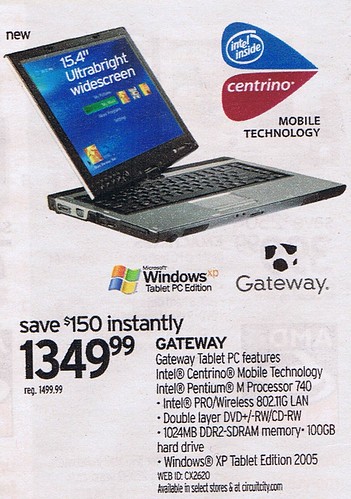
This was in Circuit City's insert in last Sunday's NY Times.
Sorry for blogging so little these days. I am going to EMC World on the 24th and will try to blog that.
Labels: TabletPC
Saturday, March 11, 2006
a few OneNote/TabletPC annoyances
- OneNote and Word integration broke somewhat recently. Now, every time I do a File-- to-- I am first asked what format I want to use. The only one that works is Single File Web Page (e.g. MHT). Then Word launches, but has no File or any other menus. Since mostly I am presenting my notes to a client, I would like to use a Word template that includes a header and footer. Thus I have to press Ctrl-N to open a new Word document which does have the menus. Then I have to do a File-- so that my choice of template is available. Then I copy from the original (menu-less) Word document into the one from the template, save it, and close all three Word windows. This is annoying.
- I know I have discussed this before in another context, but the fact that OneNote launches Word differently than when I do so from my start menu annoys the crap out of me. Besides the above issue, it means that if I had Word open for any other reason and do a File-- To-- I get prompted about multiple changes to NORMAL.DOT by the OneNote-launched instance, and have to answer several dialog boxes to exit. I basically close Word now before I let OneNote launch it. This, too, is annoying.
- OK, I apologize to the TabletPC community for neglecting them for the last three months, so here's one for you. One nice thing to do for meetings is to type everything you want to talk about in a note page as bullet points or whatever and then write comments on it during the meeting. Seems logical that you would discuss the first bullet point, and write your notes underneath it, using the Insert Extra Writing Space button as necessary. However, most of us use 10-point font, but College Ruled OneNote paper is like 16.5-point. And, Insert Extra Writing Space tends to follow the point size of the font, rather than the writing space. So you're always starting to write, finding that the guide wants you to write in 10-point height, and then trying to make your letters big enough to "stretch" the guide, and then you lose track of what the person in your meeting was saying in the first place. The best thing about OneNote is that you can write right on a pre-prepared agenda whenever you think of something you want to talk about in an upcoming (or not yet scheduled) meeting, keep these agendas around for when you actually get a chance to meet, and write the responses/resolutions right into OneNote. But the whole dragging the Insert Extra Writing Space thing around and fixing your font size is tiresome.
- Update: Not only am I behind in my blogging, but also my reading of key blogs. Looks like Chris Pratley has had his team address some of these issues in OneNote 12.
- I hope and assume OneNote 12 will fix this, but what has recently become a big annoyance with shared sessions is that if two people type at the same time on a line, the line becomes hopelessly screwed up to the point where you can't even tell what it used to say. So me and my coworker have taken to adding all these extra lines and then trying to guess who will type into which line. I've also noticed a few times that shared sessions on less-reliable wireless networks sometimes have dropouts which will eat entire paragraphs of notes. I'll be typing and then all of the sudden a block of what my coworker typed will overwrite it. It's annoying. I've noticed this mostly in big meetings with a lot of people on wireless at once (presumably saturating the WLAN) or when my coworker has problems with his other Office apps.
--sbreck
technorati: TabletPC, OneNote
Thursday, December 15, 2005
My (almost) 365 days with a TabletPC
Tonight, Memeorandum yielded a nice article by TDavid, a regular TabletPC blogger who I have read in the past but have not kept up with in the past few months. (I have not really been keeping up with certain subsets of my RSS feed list and TabletPCs have definitely been one of them.) He has just passed 365 days as a TabletPC user and since I am coming close to that milestone myself I realized I had a couple things to say about my own experience as well as about TDavid's article:
Positive things about the last ~340 days as a TabletPC user:- Taking ink notes in OneNote
- No more pads of paper
- Searchable (conversion willing) hand-written notes
- Much less antisocial form factor than a keyboard with a screen blocking off the people across the table from you in a meeting
- It is now second nature for me (and my coworkers have stopped giving me shit about this) to bring the tablet into a meeting to take notes. Why would you ever write on a pad of paper?
- Admittedly, when I interview prospective consultants for my company, I usually leave the tablet at my desk and revert to paper. Part of it is that I don't want to derail 5 minutes of a 30-minute interview by discussing the tablet with them, part is that I don't want to distract myself with e-mail and whatnot, and part is that my battery doesn't last for four half-hour interviews.
- Otherwise, I take the tablet to every meeting. The power supply comes along too :)
- MindManager Pro
- After sitting and staring at a Microsoft Project plan for an hour, I launched MindManager, picked up the pen, and had an entire 200-item project plan an hour later.
- The handwriting recognition in MindManager is very accurate compared to OneNote
- I wrote a few reviews for my employees and the words just flowed when I understood that I didn't have to answer each question in order. I know I could have jumped around in the Word template but when staring at a Word document it just wasn't flowing for me. I try to do this with Word now now that my trial copy has expired but I miss MindManager.
- I wish my company had bought it for me, the application was fantastic during the trial. It is unfortunately a profoundly expensive application and I had to say goodbye before I could convince my IT manager of its value.
- Snipping Tool (http://www.microsoft.com/windowsxp/downloads/powertoys/tabletpc.mspx)
- Seriously, even though these days I use my tablet in convertible mode (e.g. without the pen) 90% of my day, not a day goes by in which I don't launch Snipping Tool, take the pen out of its slot, circle something, and send it to a coworker.
- I know TDavid mentioned it and so probably does every other TabletPC blogger, but for real, Snipping Tool rocks so hard. What a genius utility.
- Firefox + mouse gestures
- I use All-in-one Gestures (https://addons.mozilla.org/extensions/moreinfo.php?id=12) for its Mouse Gestures feature. Though I started using it long before I had a tablet because it was just convenient, it is actually invaluable in tablet mode. Back and Forward, whatever; but Up for new window, Up-Down to scroll to the top of the screen (and Down-Up to go to the bottom), and Right-Left-Right to close the window save you a lot of hand movement. Any time you don't have to move to the scroll bar or up to the Close Tab button just means more convenient keyboard-free browsing.
- I just installed Gecko TIP (http://geckotip.mozdev.org/) because TPC TIP wasn't compatible with Firefox 1.5 on the advice of the Magic Spot blog. Though I haven't used it much, it sounds like it fixed the problems that made using the pen to enter URLs and whatnot into Firefox so annoying.
- Negative:
- Converting the ink notes (e.g. when I need to present minutes to a client)
- Font size problems are to be expected
- OneNote NEVER understands the difference between my commas and my periods.
- Attempting to use ink in a OneNote shared session
- The application was clearly not designed for this since it only supports drawing mode rather than inked text mode.
- Far slower speed of writing versus typing
- If I had a slate instead of a convertible tablet, or if I couldn't type 90 WPM, I think writing would be radical. But I can touch-type like a madman, and every time I can do so without annoying others, I will do so.
- However, I have experienced what other TabletPC users have described as a more contemplative use of the computer when writing. It is just different writing in OneNote or into a mind map; a more relaxed pace if you will. I do tend to switch to tablet mode and take out the pen when on the phone with someone, or when sitting around my apartment trying to brainstorm something.
- That said, for things like Outlook e-mail, it is so much slower to use the TIP, particularly if you actually correct the misinterpreted words, that I just never perform my regular "information worker" tasks using the pen.
- Like anything else, different people have different work styles, and much of the time, my work style is more compatible with using my tablet as a traditional laptop.
I also had a few comments on TDavid's post:
- I tried ActiveWords and hated it. I know this makes me a rebel tablet user but I guess I am set in my ways such that a combination of a few quicklaunch icons and my Run command history was good enough for me.
- I checked out TDavid's "crink blog" (CRappy INK, http://www.tabletpcblogs.com/blogs/tdavid/default.aspx) and am intrigued. I really have no plans to blog at work (which is where I use my tablet, for the most part) so I'm not really going to be inking except in my hotel room in St. Louis after I've finished my work for the night, but maybe sketching something quickly would get me back on track to blog regularly.
- Though I always jump at the chance to evaluate new PowerToys, I couldn't think of a use for those offered by tabletdev.com (http://www.tabletdev.com/Downloads.aspx)
- I agree with TDavid, ArtRage rocks. I used to dread trying to create something worthwhile using Corel Painter since it was so time-consuming, but using ArtRage with a picture to trace has nudged me to create many more artistic things. I even found I was taking random shitty pictures of things on my Treo just to have something to trace in ArtRage. Cool.
Labels: TabletPC

